Edtek Cite
Surface the authority behind every claim.
Automatic inline annotations with rules, case law, and regulations. Every claim linked to its source, with summaries and context.
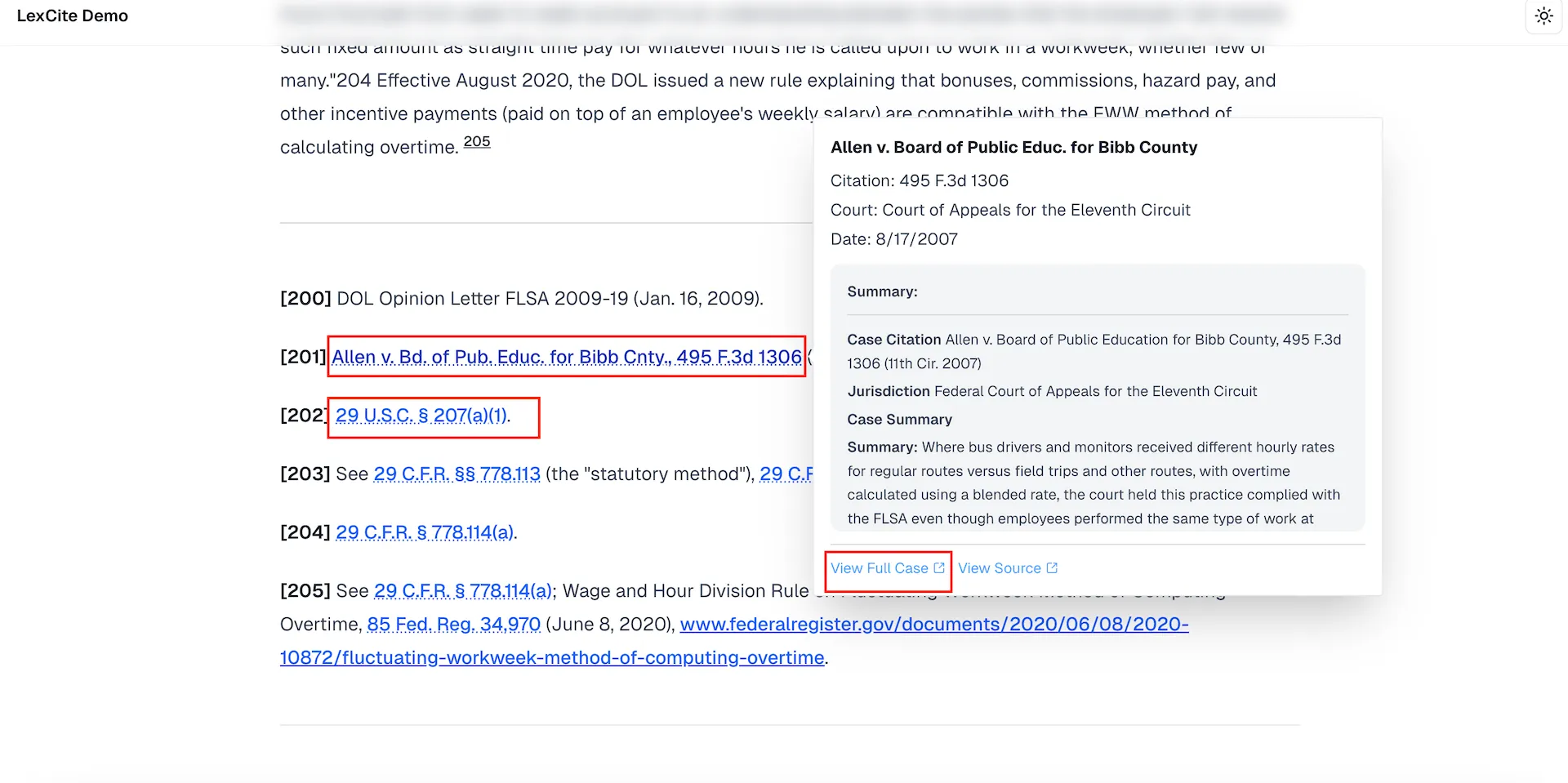
Who uses Edtek Cite
Litigation & brief review
Every assertion in a brief gets matched to its case law, statute, or regulation. Opposing counsel's claims are verified against the actual sources.
Editorial fact-checking
Manuscripts and articles are scanned for claims that need sourcing. Supporting and conflicting references surface automatically.
Audit & advisory reports
Client-facing reports get annotated with regulatory citations and internal methodology references. Every finding is defensible.
How Edtek Cite works
From raw document to fully annotated in seconds.
- 1
Upload your document
Drop in a brief, contract, manuscript, or report. Edtek Cite works with PDFs and common document formats.
- 2
AI scans for claims
The engine identifies assertions, legal references, regulatory citations, and factual claims throughout the text.
- 3
Authorities surface inline
Each claim gets annotated with the relevant rule, case, or regulation — complete with summary and key passage.
Why It Matters
Stop tab-switching. Start verifying.
Verifying a single claim normally means Westlaw, Google, three regulatory sites, and a dozen open tabs. Edtek Cite collapses that into a side panel.
Without Edtek Cite
- Read a claim in the document
- Open Westlaw in a new tab, search
- Cross-reference against regulations
- Check internal precedent database
- Copy findings back into notes
- Repeat for the next claim…
~15 minutes per claim
With Edtek Cite
- Upload the document
- All claims are highlighted automatically
- Click any highlight → authority, summary, and source link appear in a side panel
- Done. Move to the next claim.
~15 seconds per claim
Capabilities
Automatic authority detection
Identifies legal citations, regulatory references, and factual claims — no manual tagging required.
Inline highlights
Claims are highlighted directly in the document with expandable context panels — no separate window needed.
Source summaries
Each annotation includes a concise summary of the cited authority, the key passage, and relevance to the claim.
Direct source links
Jump from any annotation to the original source document, regulation, or case filing with a single click.
Works with your tools
Upload documents directly or connect to your existing document management system. No workflow disruption.
Broad source coverage
Supports legal citations, regulations, published works, and your own internal reference materials.
Frequently asked questions
What is Edtek Cite?
Edtek Cite is an AI tool that reads documents, identifies every factual claim and legal reference, and automatically surfaces the applicable rules, cases, and regulations — inline, with context summaries and direct source links.
How does Edtek Cite work?
Upload a brief, contract, manuscript, or report. The AI engine scans the text for assertions, legal citations, and factual claims, then annotates each one with the relevant authority — complete with a summary, key passage, and link to the original source.
What types of documents can Edtek Cite analyze?
Edtek Cite works with legal briefs, contracts, manuscripts, audit reports, regulatory filings, and any document containing claims that reference external authorities. It supports PDFs and common document formats.
Can Edtek Cite check citations against my own internal documents?
Yes. In addition to legal citations and regulations, Edtek Cite can verify claims against your own internal reference materials, firm policies, and custom knowledge bases.
How fast is Edtek Cite?
Edtek Cite processes documents from raw text to fully annotated in seconds. The inline annotations appear directly in the document, with expandable context panels — no separate window or manual lookup required.
One platform, three products
Connected intelligence across your entire content workflow.
Edtek Chat
Intelligent Interaction
Turn your documents into a responsive chatbot with source-verified answers and page-level citations.
Learn moreEdtek Draft
Document Builder
Create templates from your documents and generate at scale, or connect a database and let AI verify, rewrite, and enhance every section.
Learn moreSee edtek.ai in action.
Book a 30-minute demo with our team to explore how our products can transform your organization's verified content into intelligent tools.