Grounded answers
Every claim opens to the page it came from.
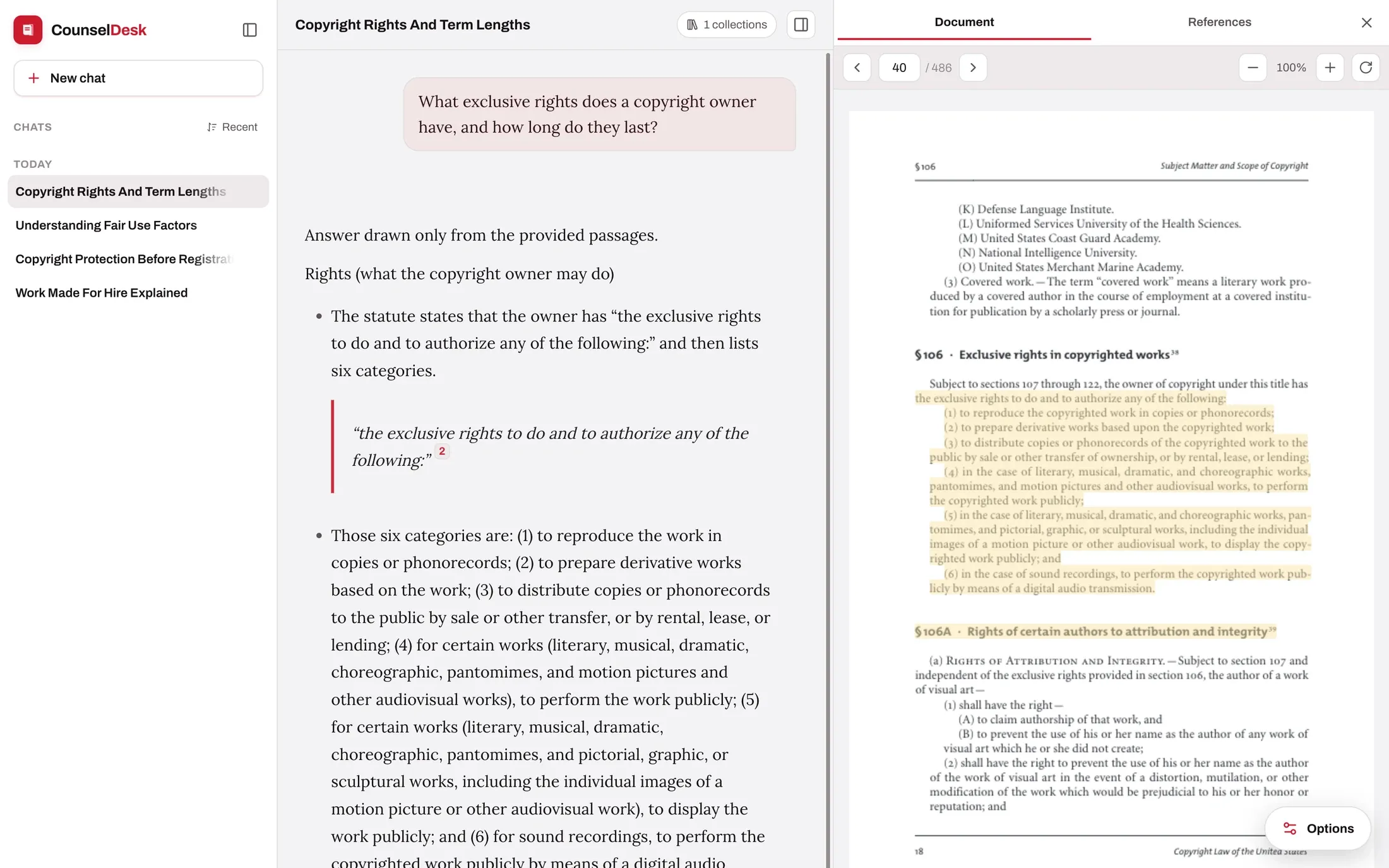
Edtek Chat answers from the documents you gave it, marks each claim with a numbered reference, and puts the source page next to the answer with the retrieved passage highlighted. Checking an answer takes one click, not a search.
What a reader gets
An answer, its receipts, and what it left out.
Three things arrive together on every turn. None of them require the reader to trust the model.
Citations
Numbered markers, assigned by retrieval
The numbers on an answer are not written by the language model. They are handed out by the retrieval step, in the order passages came back, and bound to those passages for the life of the turn.
- A marker always resolvesA reference to a passage that was not retrieved is removed before the answer reaches the screen. There is no such thing as a dead citation in the interface.
- Sources used, and sources not usedThe card under the answer separates what was cited from what was found, judged relevant, and left uncited — so a reader can see the shape of the evidence, not just the part that made it in.
- The passage itself, on demandExpanding a source shows the exact retrieved text, its match score and its page, without leaving the conversation.
Refusal
When the library has no answer, it says so
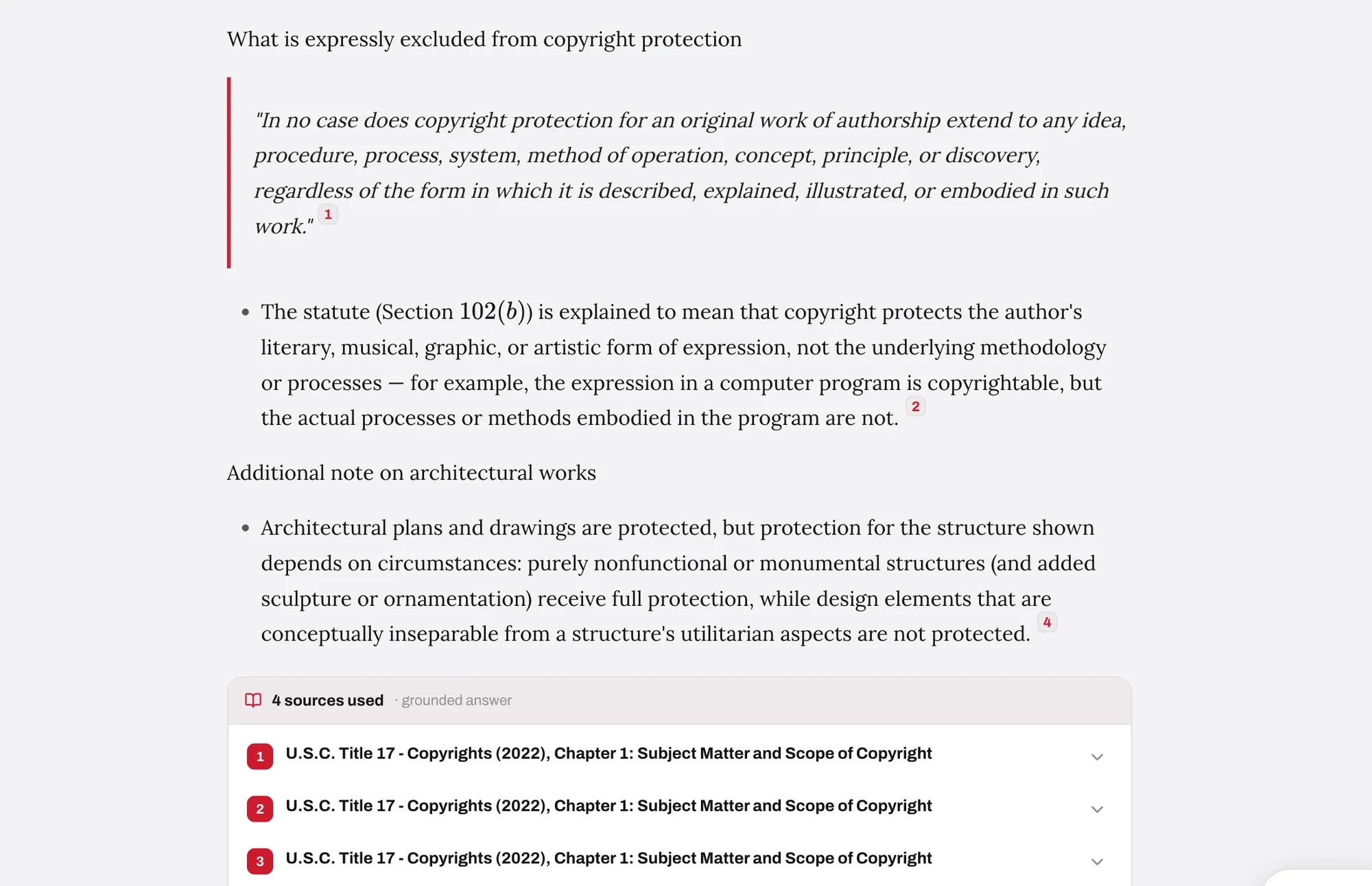
If nothing in the selected documents matches closely enough, there is no grounded answer to give — and the product says so rather than reaching for something else.
- Nothing to generate from, so nothing is generatedOn the first question of a conversation the refusal is a fixed message and the answering model is never called at all.
- On a follow-up, it may still answer from the conversationWith history enabled, a dead end mid-conversation lets the model answer from the conversation so far — outside knowledge forbidden, citations forbidden, and told to say plainly when the answer is not there either.
- It tells the reader what to try, in your wordingWiden the collection scope, lower the match strictness, or rephrase using terms from the documents. The refusal text and every phase label are configured per deployment.
Scope
The reader decides what may be searched
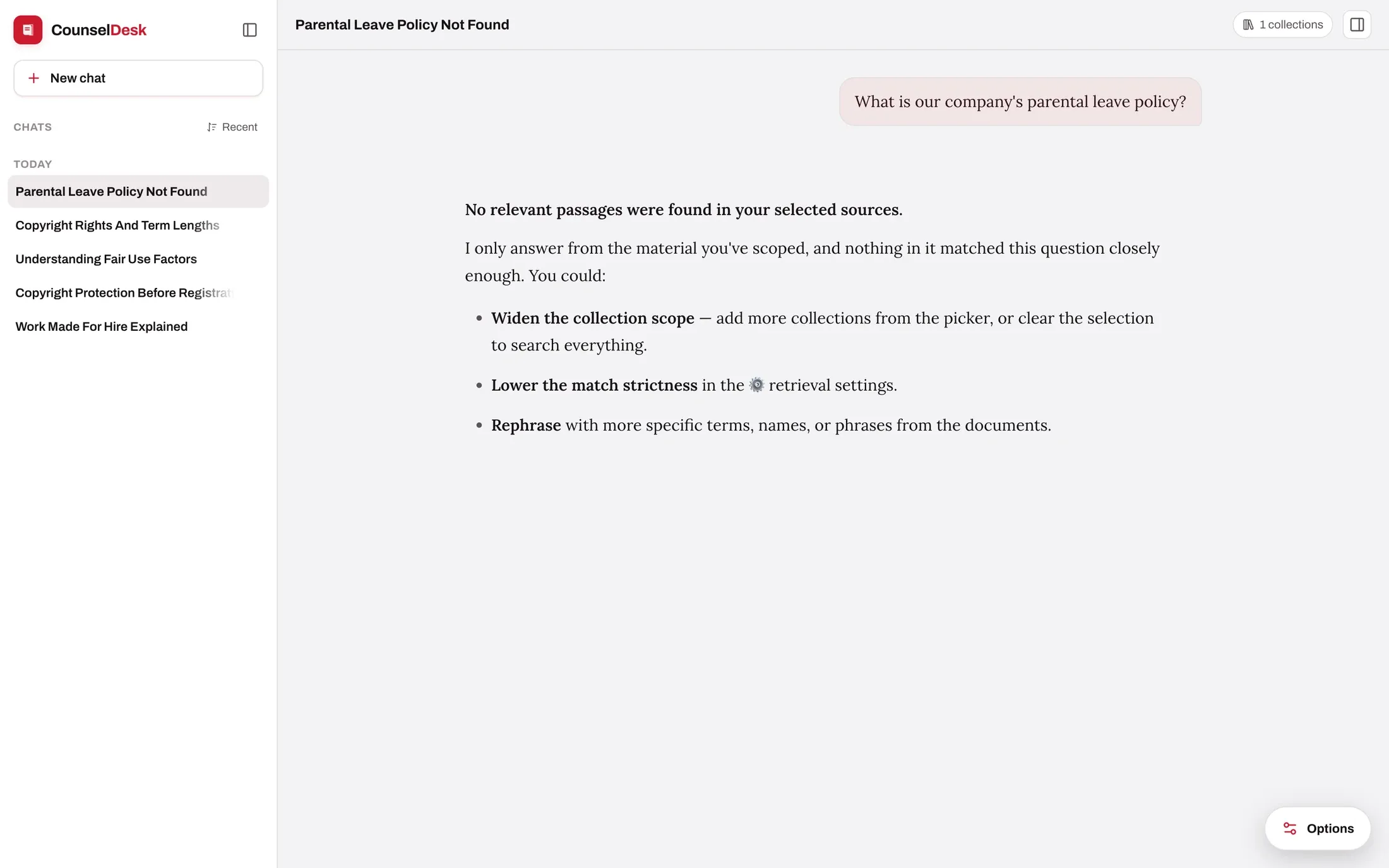
Answers are only as trustworthy as the shelf they came from. A reader can narrow a question to a collection, or to individual titles inside it, before asking.
- Pick whole collections, or expand one and choose single documents
- Nested collections select and clear together as a group
- Each deployment starts from a default scope you set
- The header shows how many collections are in play on every turn
Under the answer
What happens between the question and the reply.
Eight phases, in this order. Four of them can end the turn without a grounded answer, which is the point. Where a phase is a switch rather than a fact, the default is named.
- Always on
Length checkcan stop here
A question too long to fit the model’s context window is turned away before anything else runs. No retrieval, no model call, no partial answer.
- Off by default
Moderationcan stop here
An optional classifier screens the question. Configure it to block the turn outright or simply flag it for the record. It needs a moderation model you choose explicitly — there is no hidden default.
- Always on
Retrieval
The question is embedded and matched against your library’s vector index. Candidates below the similarity floor are dropped, an optional reranker re-scores the survivors, and a per-document cap keeps one long file from crowding out the rest.
- Off by default
Relevance checkcan stop here
An optional second model reads each surviving passage and judges whether it actually bears on the question. The policy is deliberately strict: a passage stays only on an explicit yes.
- Always on
Confidencecan stop here
The passages that made it through are scored into one of three states — good match, weaker match, or nothing at all. The first two are labels the reader sees, never silent filters. The third ends the turn: on a first question with a fixed refusal, or mid-conversation by asking the model to answer from the conversation so far and nothing else.
- Always on
Prompt assembly
The surviving passages are numbered and written into the prompt. If a custom prompt forgets to reference them, they are appended anyway — a configuration mistake cannot quietly leave the model to answer from memory.
- Always on
Answer
The model writes the answer against those numbered passages and cites them inline. Tokens stream to the reader as they are produced.
- Off by default
Verification
An optional reviewing pass re-reads the draft against the question and the cited passages, checking groundedness and citation accuracy, and returns a corrected version. It trades live streaming for the extra check.
The relevance and verification passes are deliberately off until you turn them on: each adds a model call, and verification composes the answer before sending it instead of streaming it. Whether that trade is worth it depends on the library and the stakes — which is a decision for the people who own the content.
Being precise about it
What is guaranteed, and what is made unlikely.
Two different kinds of claim get made about systems like this one. We would rather tell you which is which.
Enforced in code
- A citation can only point at a passage that was really retrieved.
- With no passages and no prior conversation to draw on, no answering model is called.
- Retrieved passages always reach the prompt, whatever the prompt says.
- A deployment can only search the collections it was granted.
Made unlikely, and measured
- That a cited passage really supports the sentence beside it.
- That every passage retrieved is genuinely on point.
- That the model stays inside the sources it was given.
These are what the relevance pass, the verification pass and the evaluation suite are for — and why answer quality is something we measure rather than assert.
How answer quality is measured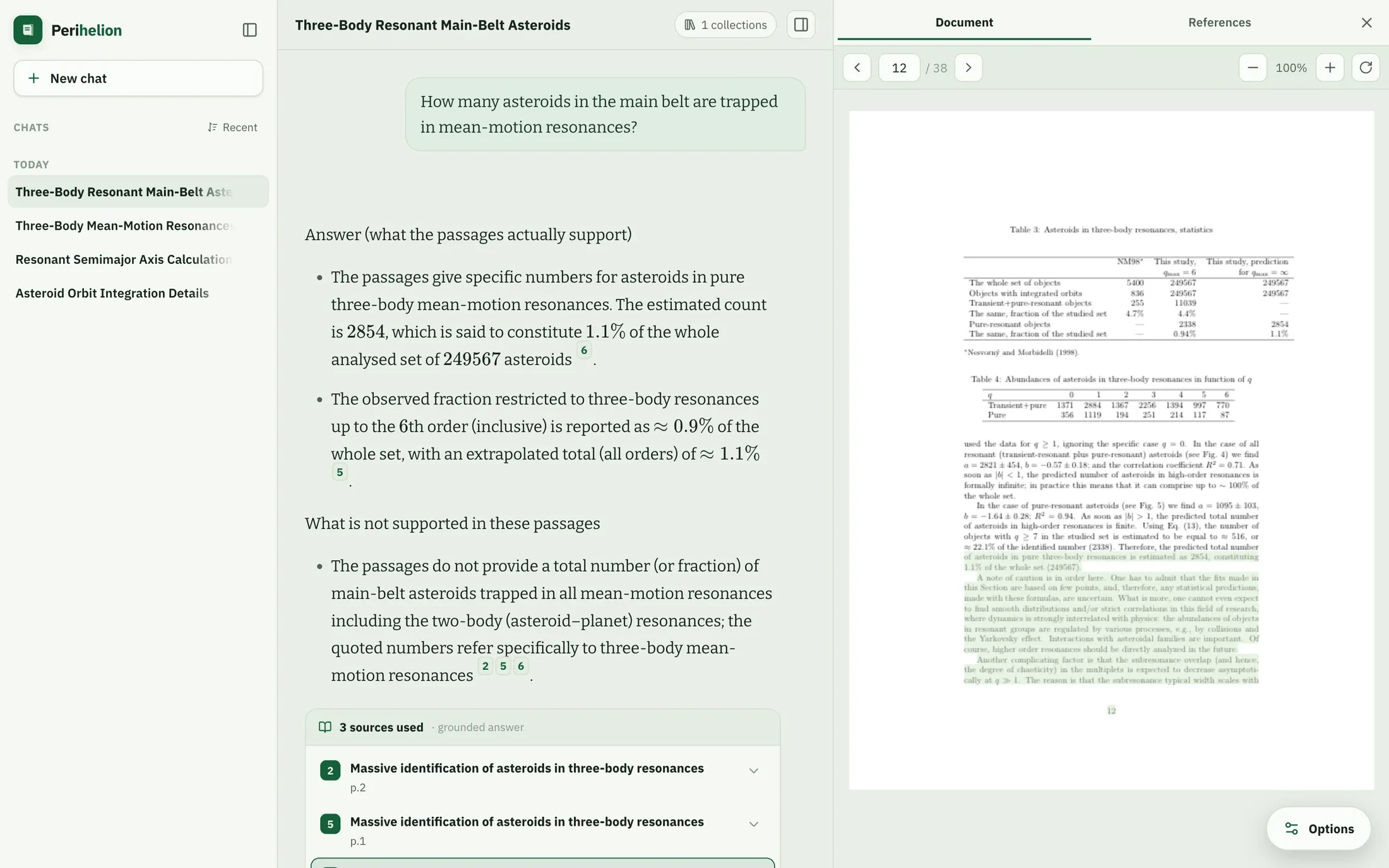
The document panel
Built for reading, not previewing.
The source opens beside the answer rather than in a new tab, so the reader keeps both. It is a real viewer: page navigation, jump-to-page, zoom, and a highlight that lands on the right words because it is computed from the page’s text positions rather than guessed.
- PDF, DOCX and Markdown — PDFs are the only format with real pages, so they alone carry a page reference and highlight on the page; DOCX and Markdown highlight the cited block.
- Split or overlay — side by side on a wide screen, a drawer over the conversation on a narrow one.
- Documents stay private — files are streamed through the app under the reader’s own session, never handed to the browser as a public link.
Frequently asked questions
Can the chatbot cite a source that does not exist?
No. Citation numbers are assigned by the retrieval step, not written by the model, and any marker pointing outside the set of passages actually retrieved for that turn is stripped before the answer is rendered. Every citation a reader can click resolves to a real passage in a real document in your library.
What happens when the answer is not in our documents?
On the first question of a conversation, the turn ends without calling the answering model at all: the reader gets a short message saying nothing in the selected sources matched, plus suggestions — widen the collection scope, lower the match strictness, or rephrase. The wording is yours to set. On a follow-up, if conversation history is enabled the model is given one narrow job instead: answer from the conversation so far and nothing else. It is instructed not to use outside knowledge, not to cite (there are no passages this turn), and to say plainly when the conversation does not contain the answer.
How does a reader check an answer?
Every claim carries a numbered marker. Clicking it opens the source document in a panel beside the answer, jumps to the page, and paints the retrieved passage. For PDFs the highlight is positioned from the page’s own text geometry, so it lands on the right words at any zoom level. DOCX and Markdown sources highlight the cited block.
Does the answer show which sources were not used?
Yes. Under each answer, the sources card lists the passages the answer cited and, separately, the ones that were retrieved and judged relevant but did not end up cited. Each can be expanded to show the retrieved text, its score and its page.
What is the “lower confidence” label?
It means passages were found and used, but none of them cleared the similarity bar set for this deployment. The answer is still shown — the label is a signal to check the citations more carefully, not a block. When reranking is enabled, an answer is only marked high-confidence if it clears both the similarity bar and the rerank bar.
Further reading
- Custom GPTs and Claude Projects: Where Upload-and-Ask Stops WorkingThe four thresholds at which a hosted assistant over a folder stops being enough — and what you have to own instead.Read
- Citation-Grounded LLMs: Why Every AI Output Needs SourcesDocument-level, page-level and claim-level citation, and the trust each one actually buys.Read
Bring a hard question and your own documents.
The fastest way to judge grounding is to watch it refuse. Book a demo and ask it something your library does not cover.