Customization
One deployment, many chatbots.
An instance is a chatbot: its own brand, its own shelf of documents, its own prompt, model and retrieval tuning, at its own URL. Everything on this page is a setting in an admin console — not a fork, not a theme file, not a release.
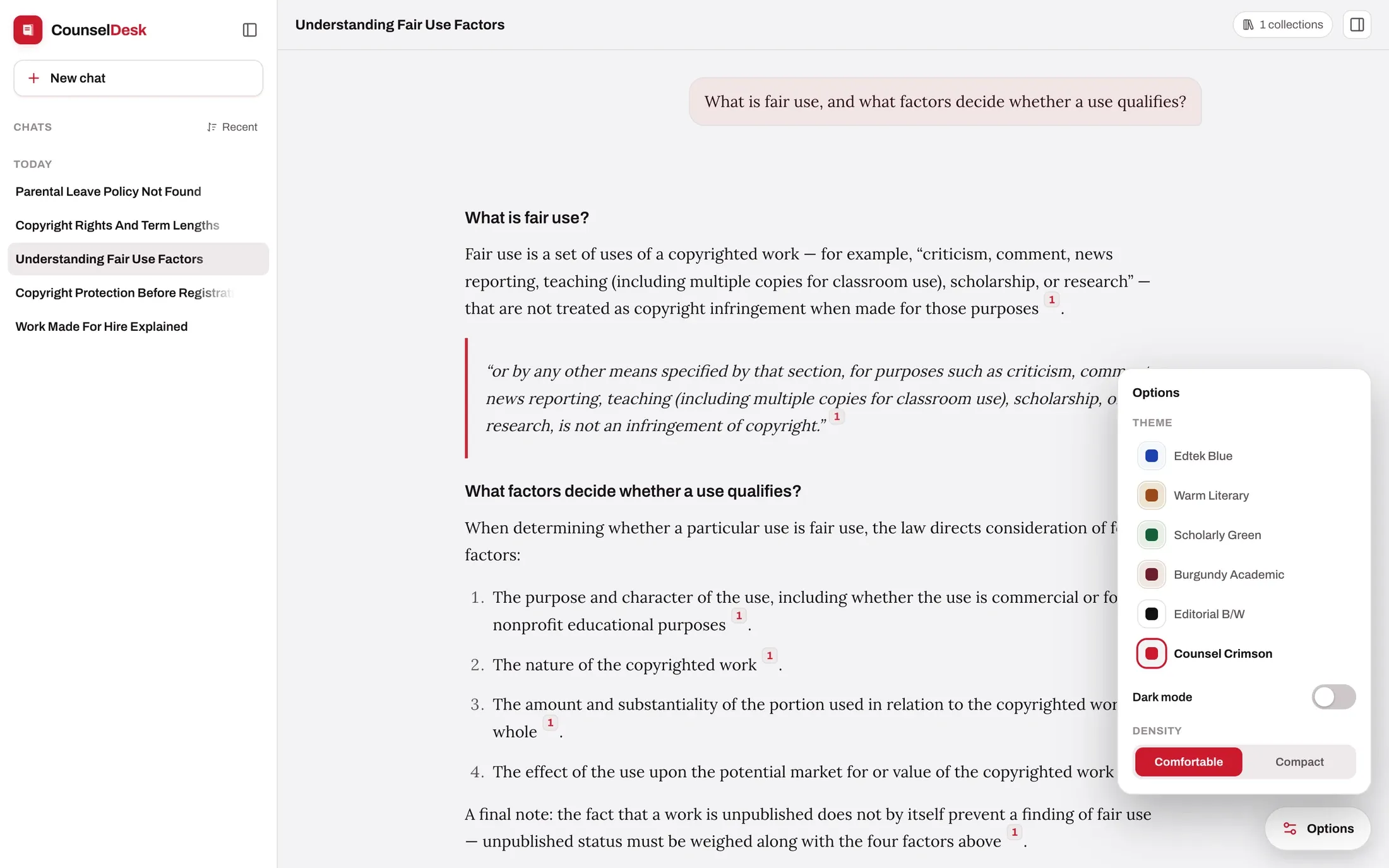
The same product, twice
Both of these are the same installation.
Different name, mark, palette, prompt and library — one codebase, one database, two rows of configuration. Both are mid-answer, because that is where the difference actually shows.
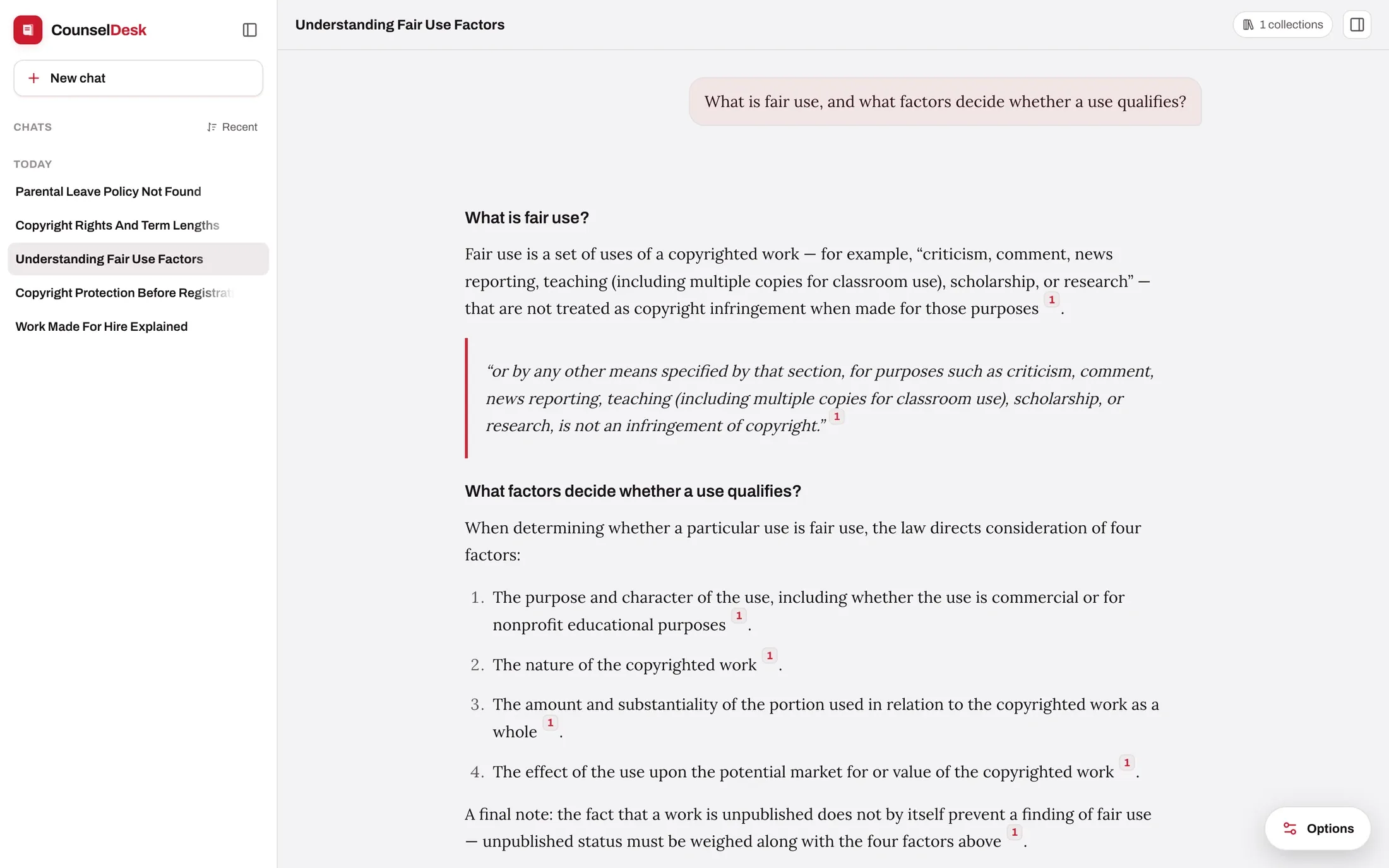
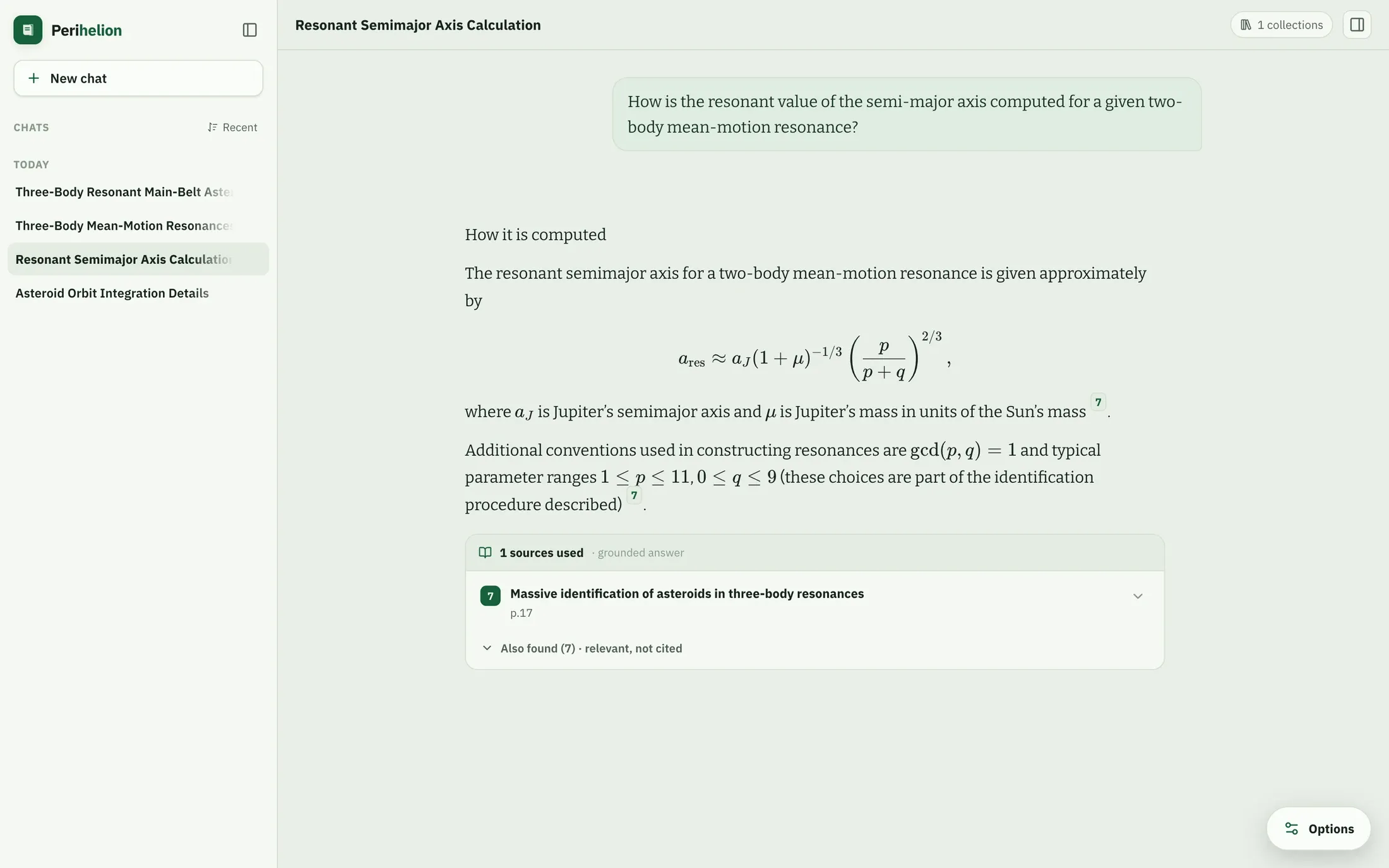
Both are example configurations, set up in the admin console in a few minutes. Neither required a line of code.
How settings resolve
Instance, then global, then the shipped default.
Every field falls through three layers, and the console never leaves you guessing which one is in force.
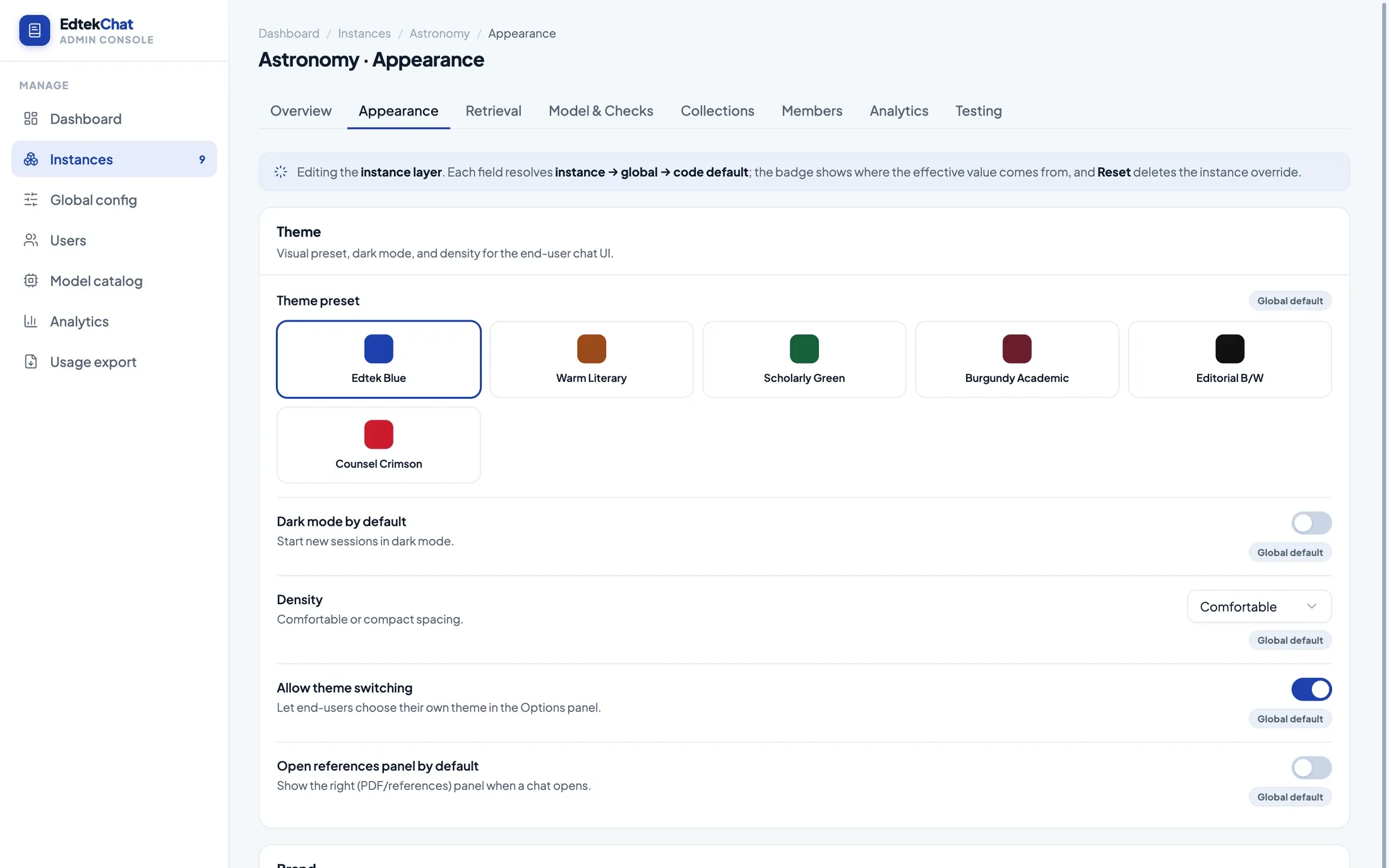
The config chain
A badge on every field says where the value came from
Set your house style once at the global layer and it applies everywhere. Override it for one deployment and only that deployment changes. Reset the override and the field falls back — visibly.
- Three layers, one answerInstance beats global, global beats the value the product ships with. Nothing is hidden in an environment variable.
- Overrides are reversibleReset deletes the instance row rather than copying the parent value into it, so a later change to your global default still reaches this deployment.
- Invalid settings cannot be savedEach block is validated on write, including the relationships between fields — thresholds must stay ordered, and a pass cannot be switched on without the model it needs.
Prompting
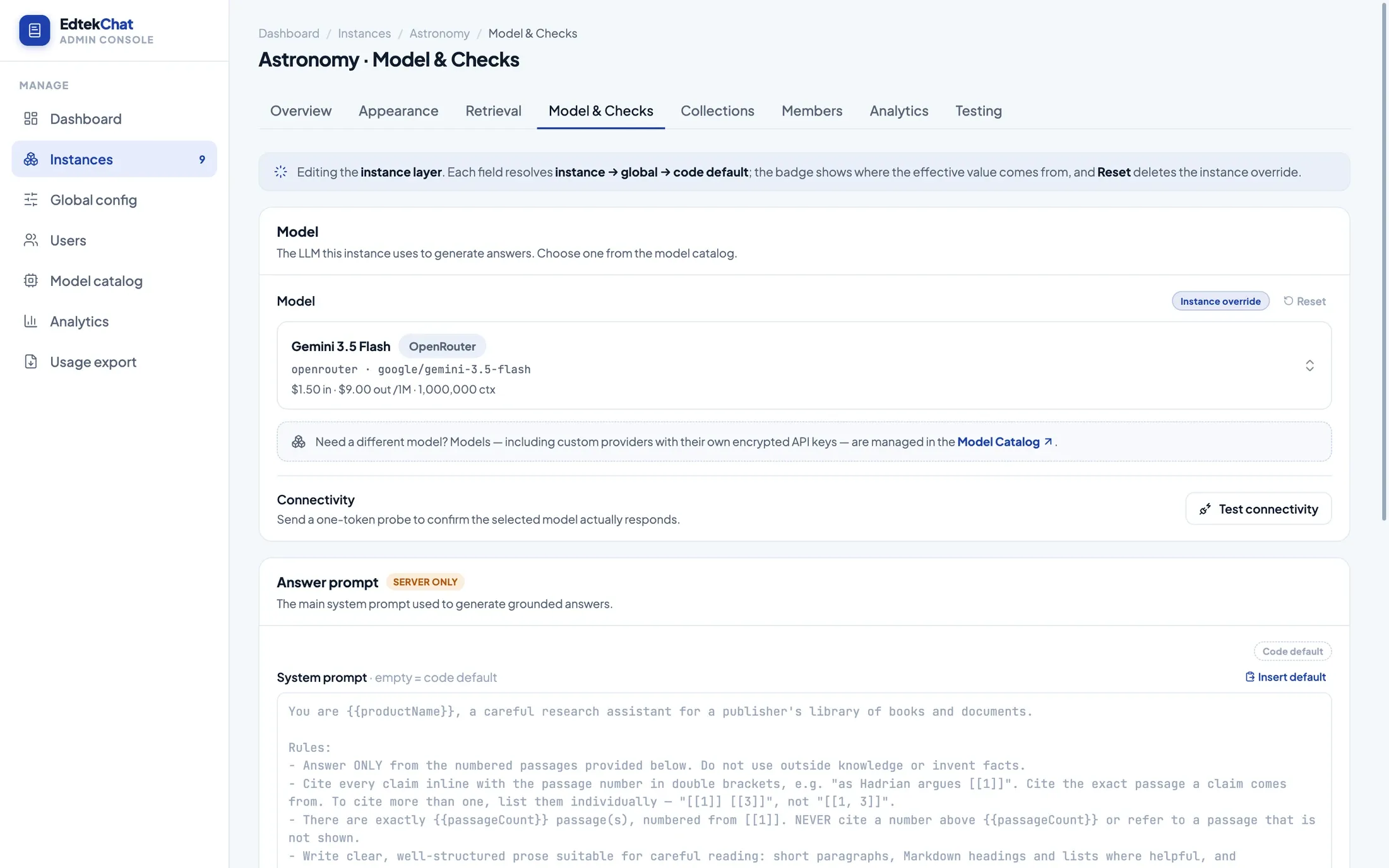
The prompt is a text field, not a build artifact
The instruction the model answers under is editable per deployment. So is the prompt for the relevance pass, the verification pass and the moderation classifier — each with its own model, if you want a cheaper one doing the checking.
- Insert the shipped default as a starting point, then edit it
- Clear the override to fall straight back to the default
- Pick a different answering model per deployment from your catalog
- Send a one-token probe to confirm the model actually responds
Retrieval
Tuning that survives contact with a real library
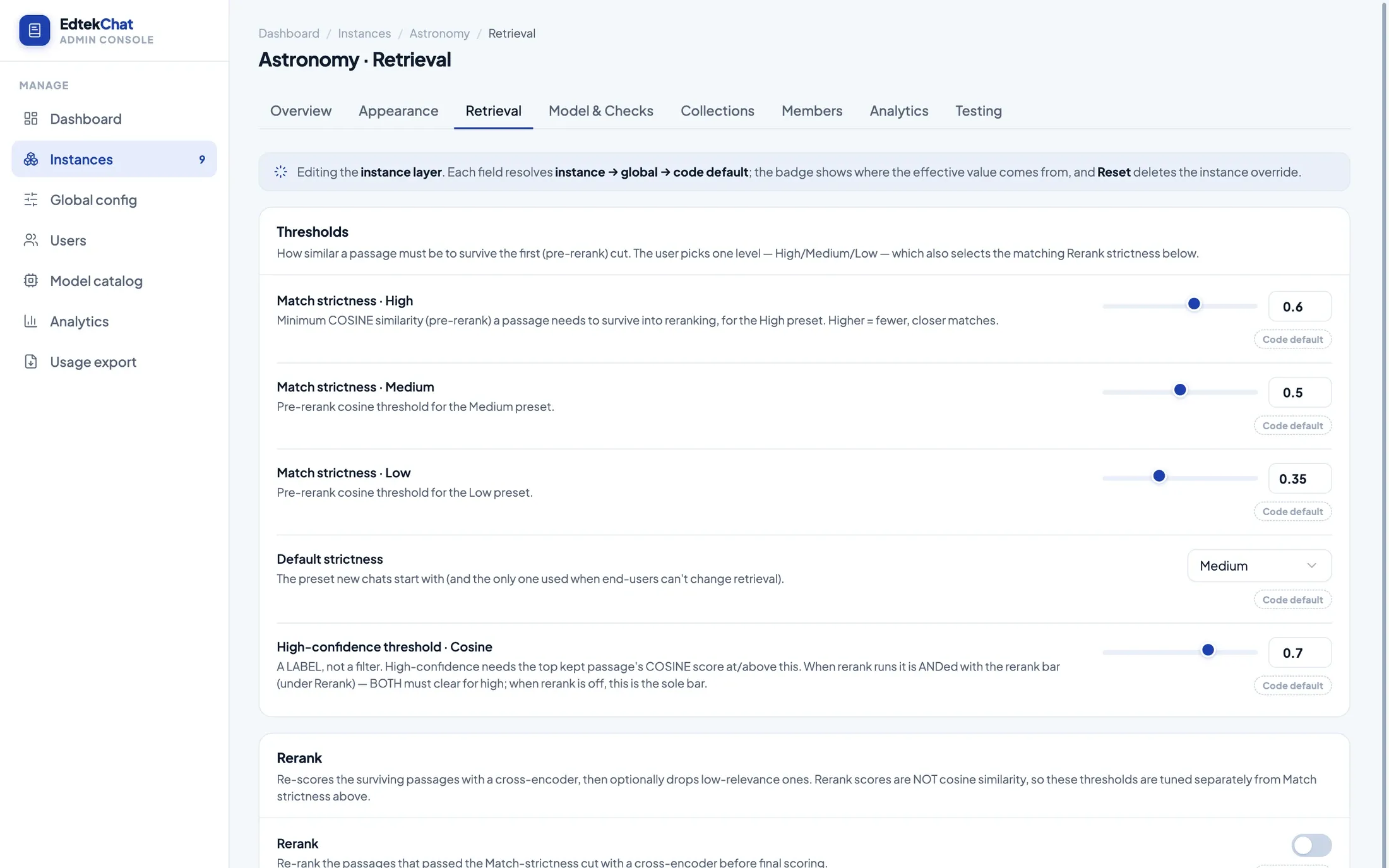
A shelf of dense statutes and a shelf of long research papers do not want the same settings. Both scales — cosine similarity and rerank score — are tuned separately, because conflating them is how retrieval quietly gets worse.
- Thresholds a reader can moveHigh, medium and low strictness are your numbers; the reader just picks a level, and only if you allow it.
- Reranking is opt-inOff until you add a rerank model and switch it on, at which point a second set of thresholds applies on the rerank scale.
- Breadth and depth are separate dialsHow widely the index searches, how many candidates are pulled, how many passages reach the prompt, and how much of an answer one document may supply.
The full surface
What is a setting, in full.
Not a highlights reel. This is the list, grouped the way the console groups it, so you can check whether the thing you need to change is a field or a feature request.
Appearance, brand and welcome
- Theme preset
- Six palettes, each with a matching light and dark treatment.
- Dark by default
- Which mode a new session opens in.
- Density
- Comfortable or compact spacing throughout the interface.
- Reader control
- Whether readers may change theme, mode and density for themselves.
- Logo
- Upload PNG, JPEG, WebP, GIF or SVG up to 512 KB, or point at a URL.
- Product name
- What the chatbot calls itself, in the sidebar, the tab title and its own answers.
- Brand name and accent
- The two-tone wordmark in the sidebar header.
- Tagline
- The line under the product name.
- Welcome title and subtitle
- The first thing a reader sees on an empty conversation.
- Welcome tips
- The cards under the welcome heading — each an icon from a fixed set, a heading and a line of copy.
- Library list
- Whether the welcome screen lists the collections available to this deployment.
- Reference panel
- Whether the document panel starts open.
Answering behaviour
- Answering model
- Any chat model in your catalog, chosen per deployment.
- System prompt
- The full grounded-answer prompt, overridable with the shipped default one click away.
- Relevance pass
- On or off, with its own model and its own prompt.
- Verification pass
- On or off, with its own model and its own prompt.
- Moderation
- On or off, block or flag, with a classifier model and refusal text you set.
- Refusal message
- What a reader is told when the library has no answer.
- Status labels
- The wording of each phase — searching, checking relevance, composing, verifying.
- Error and overflow text
- What a reader sees on a provider failure or an oversized question.
- Conversation history
- On or off, how many prior messages carry forward, whether their sources come too.
- Reader controls
- Whether readers can adjust retrieval settings, or share a conversation.
- Default scope
- Which collections a new conversation starts with — all, none, or a named set.
- Logging
- Whether model calls are recorded, and whether full message text is kept.
Retrieval and library scope
- Match strictness
- Three similarity floors — high, medium, low — that a reader picks between.
- Default strictness
- Which of the three a new conversation starts on.
- Passages per answer
- How many passages reach the prompt, and the ceiling a reader may raise it to.
- Per-document cap
- How much of one answer a single document is allowed to supply.
- Candidate pool
- How many matches are pulled before filtering and reranking.
- Recall floor
- How widely the vector index searches before it starts discarding.
- Reranking
- On or off, with any rerank model from your catalog.
- Rerank thresholds
- A second set of floors on the rerank scale, tuned independently of similarity.
- Confidence bar
- Where a good match ends and a weaker one begins — on both scales.
- Exposed collections
- Exactly which collections this deployment may search, and which allow document-level picking.
Settings that shape answers — prompts, checks, moderation, history, logging — are held on the server and never sent to a reader’s browser.
Reader-side
Hand some of it over, or none of it.
Some libraries want a locked, uniform interface. Others serve readers who work at night and want the dark palette, or who know exactly which two titles hold the answer. Each instance decides how much of that is the reader’s call.
- Theme, mode and density — offered through an options panel, or fixed by you and never shown.
- Retrieval settings — match strictness and passage counts, within the bounds you set.
- Sharing — a read-only public link to a conversation, optionally password-protected and time-limited. Off unless you enable it, and source documents stay private even on a shared link.
Running several
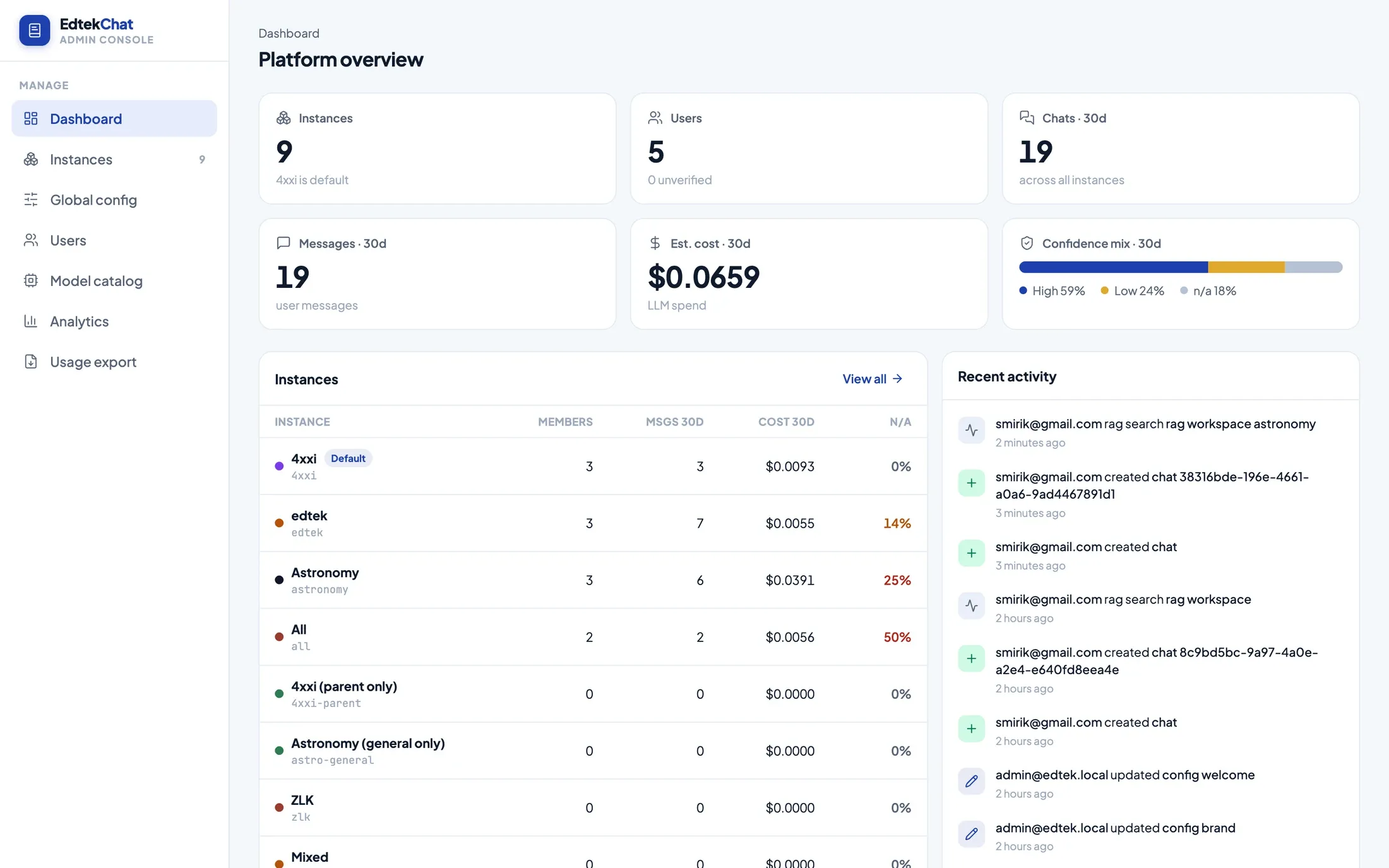
Every instance is separate, and all of them are in one place.
Each deployment has its own members, its own shelf and its own settings. The console keeps the whole estate on one screen — who is using what, what it costs, and how often answers come back unsupported.
Frequently asked questions
How many chatbots can one deployment run?
As many as you need. Each one is an instance: its own name, branding, welcome screen, prompt, model, retrieval tuning, collection allowlist and members, living at its own URL under the same installation. Nothing in the product caps the number.
Do we need a developer to change any of this?
No. Everything on this page is a field in the admin console. Changes take effect for the next question asked — there is no build, no deploy and no release to wait for.
What is the config chain?
Every setting resolves through three layers: this instance, then your global defaults, then the value the product ships with. The console shows a badge on each field saying which layer the current value came from, and a reset that removes the instance override and falls back. Set a house style once globally; override only what a particular deployment needs.
Can readers change the look themselves?
If you let them. Each instance decides whether the theme, light or dark mode, and density are yours to fix or the reader’s to choose. When a reader does choose, the preference is remembered per deployment and applied on the first paint, so there is no flash of the wrong theme on load.
Can we edit the system prompt?
Yes — the full grounded-answer prompt, per instance or globally, with the shipped default available to drop in as a starting point and a one-click way back to it. The relevance, verification and moderation passes each have their own editable prompt as well.
Bring your brand guidelines and a hard question.
We will stand up an instance in your colours, on your documents, and let you try to break it.